Friday, October 31, 2014

10/31 Recap

Happy Halloween

Ralph Eugene Meatyard

  • Today in class, we reviewed our previous assignments to date. And gave each other feedback on our Levitation, Multiple Me, and Cubist Perspective assignments. We also worked on our Dropbox, getting everyone caught up. I apologize if you've received 1000 dropbox emails lately, but we discovered an hour. I originally had shared a "link" to the shared folder, when I should have sent an "invitation" to the shared folder. You should have received an email by now about this. Please accept the invitation and then upload your images into the designated folder. (All In Class work will still go to the blog.)
      • If you have not received an invitation for this, please email me ASAP. 

  • We also held a round table discussion about the next few weeks in the course. We came to the conclusion that email reminders may help. I will start this week. Expect a reminder email from now on each Tuesday. 
Libby Rowe

  • We also walked over to the art building and viewed Libby Rowe's, Pink, exhibition. I gave everyone the chance to view the work and write a review to make up 1 missing grade from the Articles/Review Posts. Please write 1-3 paragraphs on one of the following to receive credit:
      1. Write a review of the exhibit as a whole.
      2. Write a review of a single piece from the exhibit. (Be sure to include the pieces title)
      3. Write a review comparing or contrasting 2 pieces from the exhibit. 
        • Post to the "Reviews" section no later than 8:59 am Friday, November 7
Next week I will discuss the final project and we will demo Panoramas.

Your homework for the week is to get caught up on ANY missing work. Friday 11/7 is the FINAL day for makeup work. Get your reviews done and posted!

Review-Liibby Rowe

In Libby Rowe's show, Defining "Feminine" was very cool honestly. We are taught not to touch, look from a far. Many galleries that i have been in actually have sensors that alert security if you get too close.This being a submission generated piece, and her show being mostly interactive, i was blown away by the willingness of people to define feminine.The knowledge that a words connotation can vary exponentially from person to person is nothing new to me. Its Language Arts in junior high. To see the many different objects gave life to that knowledge and created a great visually intrigueing piece.

Cubism Thingy

Lindsey Shirley

Friday, October 24, 2014

New York Times- Bartholomeus Spranger
http://www.nytimes.com/2014/10/24/arts/design/metropolitan-museum-spotlights-bartholomeus-spranger.html?ref=design&_r=0
The New York Times site is a bit too busy for me. There are lot of different things going on and its a little confusing.
As a more physical artist, I appreciate other artists who draw and paint. Spranger has a very singular style and  I think the article explains this and his experience very well.
Anna Ream- Lensctratch
http://lenscratch.com/2014/09/anna-ream-comfort-objects/
So far, Lenscratch has been the best site in my opinion. I like the setup and it is visually appeasing.
I very much enjoy Ream's style and subjects. Her thought that we never forget the way some one makes us feel is very true and deep. Plus I love kids and these child models are adorable, albeit a little sad looking.
Feature Shoot- Julia Fullerton-Batten
http://www.featureshoot.com/2014/05/stunning-photographs-show-ideal-beauty-used-look-like/


Feature Shoots site is also very well put together and easy to understand.
I see Fullerton-Batten's images as very meaningful on a personal level. There is a sense of beauty even in these photos, as in todays times, these women are not beautiful. They are a prominent "F$%^ YOU" to the media and photo editors that push for super skinny.


James Buss at Hello Project
http://glasstire.com/2014/10/22/james-buss-at-hello-project/
James Buss, Untitled, 2014

The blog is easy to understand and flows well. I am not a tech savvy person so the set up was awesome to me.
Buss' art work is ver expressive to me and that is what drew me in. it is not a definitive image but more of a state in my opinion. Basically, I love the colors, speckles and its really cool.

BONUS fantabulous extra-credit, art opportunities

**EXTRA CREDIT BONUS**

In order to receive 5 bonus points (added to your lowest grade), attend any (or all?) of these fine lectures and take a selfie of yourself at the event (or with the artist!) and post it here under BONUS.


  • Ann Hamilton / Tuesday Oct 28


    • October 24

      Recap from 10/24

      Class Demo

      Today in class, individual meetings were held and midterm grade sheets were passed out. I went through each item individually and gave a plan for a "Last Chance" grade make-up opportunity. (A dropbox link for this has been sent.) 

      We then learned about the Cubist perspective. From the start of cubism at the turn of the century with Cézanne, to the artists that broad cubism mainstream: Picasso and Braque, to contemporary photographers using this technique, such as David Hockney and Joyce Neimanas.

      And then we tried some on our own. For more information, check out the "Cubist Perspective" tab under the "Assignments" section. Oh, and we talked about Class Photos.

      For next Friday, 10/31: 


      • You will need your 2 Hockney images uploaded to the dropbox. (Post your in class image to the "In Class Tab." 


      • You should also have your Levitation and Multiple-Me Projects done and uploaded as well. 

      Check out the "BONUS" tab for some fabulous extra-credit art opportunities. 


      See you on Halloween! Feel free to bring candy and costumes! Or not. 

      Cubist Perspective

      David Hockney!

      Your assignment was to create at least two solid "Hockney" style images. You will need to add something to his style to make the images your own. 

      • Tip: use a lot of images. From multiple viewpoints, different lighting situations, multiple perspectives, etc. (At least 20 images!)
      • Experiment with different techniques. Automate? Piecing together a puzzle? Pieces from a single image? 
      These are due next Friday, Oct 31 in the dropbox folder I sent. 


      Here is a video that shows how to create a collage by piecing together individual layers like a puzzle.

      YouTube: Cubism Tutorial

      Here is a video that shows how to create a collage by using the Automate < Photomerge function in Photoshop.


      Here is a video showing how to create a collage from a single image. 


      Friday, October 17, 2014

      October 17

      Class Demo

      Today in class we reviewed the Levitation assignment and went over the Print Lab, where we printed our first images. We then learned about the next assignment, Multiple Me. You can find out more under the "Assignments" tab.

      We had an in-class shooting demo. Please post those photos under the "In Class" tab by next class. 


      Homework:

      • Get. Caught. Up.
        • If there is an assignment you haven't done, please do it and post it, so that I can grade it. 
        • If you are unsure what you're missing, please email me. 
      • I will be sending dropbox links to everyone. Please upload your files in there to turn in. 

      Next class, we will critique the Levitation and Multiple Me assignments. So please have these uploaded to the dropbox folder BEFORE class starts. We will also learn about the next project, Hockney. I will also be holding meetings to go over your Midterm Grades, so make sure you have stuff uploaded for me to grade!

      James Ford Multiple me


      Multiple-Me

      Multiple Me

      Assignment #3: Multiple Me or Multiple Places

      For this project you will create 2 images that composite different (multiple) photographs together.

      It's very similar to the "Levitation" images we made using PS layers. 

      • TIP: When you're shooting, be sure to set your camera exposure and focus to manual. And DO NOT move your camera! 
      You want your two final photographs to be connected visually and thematically. 

      • TIP: Be thoughtful about the content – what ideas are you addressing? How does the composited image facilitate these ideas? Is the work narrative-based – do you want to tell a story? Are you interested in blurring the boundaries between fantasy and reality? Etc.

      We'll all do several in class, then you will do two more on your own. One of them should use you as the subject.

      Assignment:
      You will post your 2 photographs to the blog / dropbox and bring in your 2 photographs to project in class for critique.

      DUE: October 24 BEFORE CLASS

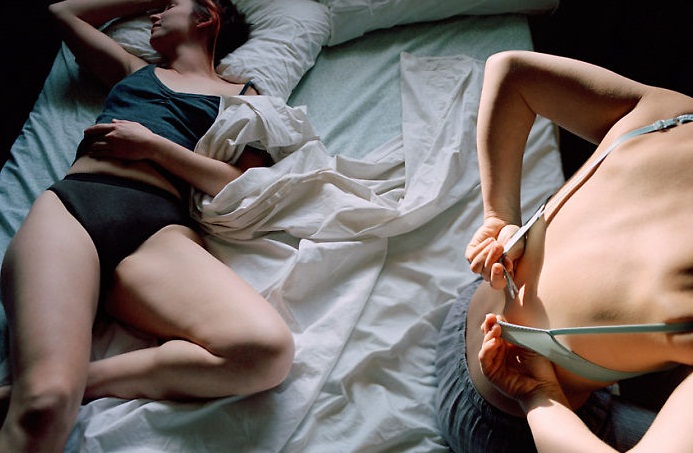
      For inspiration look at artists: Kelli Connell, Anthony Goicolea, Deborah Oropollo, Peter Funch
        
      The Space Between from "Double Life," Kelli Connell

      Getting Up from "Double Life," Kelli Connell

      From the series "You and What Army" by Anthony Goicolea

      From the series "Deja Vu" by Peter Funch

      Care Taker from the series "Babel Tales" by Peter Funch

      From the series "Rapport" by Claudia Rogge

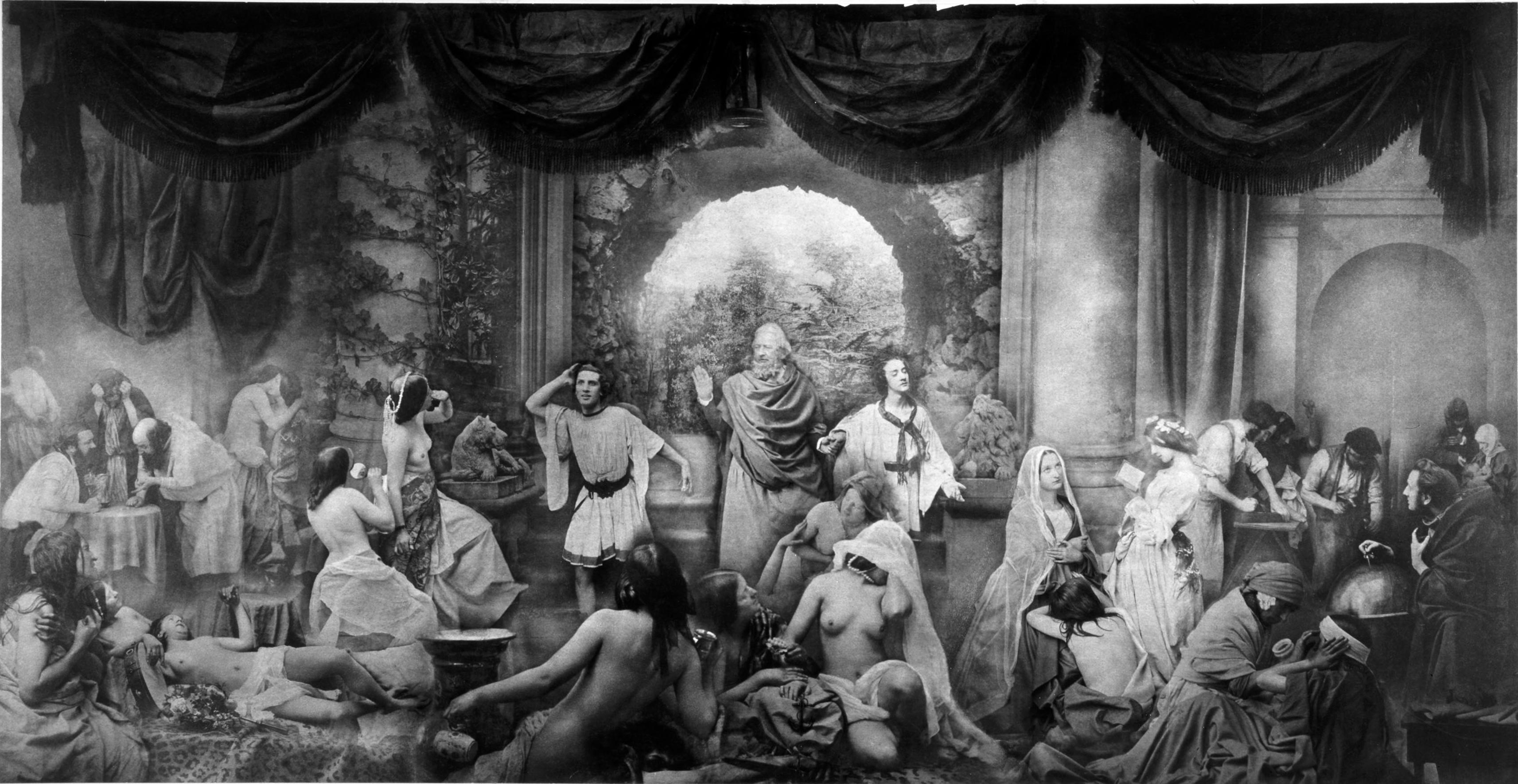
      Think combination or montaged images are only a recent development from the advent of Photoshop?

      Check these out: 
      Oscar Gustave Rejlander's allegorical tableaux The Two Ways of Life consisted of over 32 negatives. 1857 

      Henry Peach Robinson's famous morbid image Fading Away. 1858


      Helpful Guides:

      • http://content.photojojo.com/inspiration/a-digital-guide-to-cloning-yourself/
      • http://paintthemoon.net/blog/2011/07/photoshop-actions-how-to-creating-a-composite-image-combining-multiple-photos-to-create-magic/
      More inspiration:

      How to do this step by step:
      1. Shoot 2 images. 1 with yourself in one position and 1 where you have moved to a new location.
      2. Locate your images. 
        • Process in Lightroom. (make sure color/exposure/density is the same!)
          • "Sync" photos.
      3. Open both images in Photoshop.
        • Unlock background layers.
        • Locate one image. Hit (Command)⌘A to select all, and then ⌘C to copy. Locate your other image and ⌘V to paste. (Or drag and drop)
          • You can lower the opacity on one layer and use the move tool (v) to align the two images.
      1. Once they are where you want them, Go to the Layers Palette. Make sure one layer is selected. Drag this layer onto the layer mask icon to create a layer mask.

      5. It should now look like this: 


      6. With the white box in the layer mask selected, press ⌘I to invert the layer. Your screen should now look like this:


      7. Select your brush tool (B) and make sure that your painting with white. Using 100% opacity, paint out the subject to erase it from view. 


        •  When finished, save one copy with the layers as a PSD. This is a working file for your records, in case you want to go in and change anything later. 
          • Now go to Layer -- and Flatten Image.
            • Save this copy as a TIFF (for print) and as a JPEG, to upload to blog.
      1. Lastly, upload your 2 completed "Multiple Me" to the dropbox link no later than before class on 10/24. 
      2. We will critique the "Levitation," and "Multiple Me," assignments next class, Oct 24. Please post to theses BEFORE class, and bring your files / cameras with you to class. We will learn to print, and if time allows, talk about the Final Portfolio.

      Friday, October 10, 2014

      Storm's Levitation

      Levitation in class
      10/10/2014
      Stormy Scott

      James Ford


      Alex Salas. Levitation. BOOOOOOYAAAAAAAAAA

      In Class Work

      This is where we will post all mini assignments we do in class. 

      Levitation and Multiple Me

      Next project, Levitation!


      Example of historical levitation photography

      Remember, photographers have been manipulating images long before photoshop!

      Falling Teacher

      Now that we have each made one Levitation image in class, and each of you is now a pro... For the next assignment, you will create 3 amazing Levitation images! Using either yourself or a model for the image. (It must contain a person)

      • Think about the story you will try to tell. Consider the background, lighting, color, costume, hair, props, and accessories... I want an AWESOME ONE!
      • Here are some helpful links for inspiration and tutorials:

      Here are two really great tutorials, that go a little more in depth.
      *using Selections: http://youtu.be/ZM0dc9qix9Y
      • He demonstrates syncing photos using Camera Raw in Adobe Bridge. You will be doing this in Lightroom. You can skip to 1:40.
      * using Layer Masks: http://youtu.be/HprleMPd1WY

      Inspiration Images/Links:


      Student Example

      Student Example


      Assignment for this week: "Levitation"


      • I want you to upload the Levitation image to the blog that we did in class. Title your post: Levitation - Class.
      1. For the AWESOME assignment, You will take a minimum of two photographs for each image. One of the empty scene and one with you, another person, or an object "levitating."
      2. Locate your images. 
        • Process in Lightroom. (make sure color/exposure/density is the same!)
          • "Sync" photos.
      3. Open both images in Photoshop.
        • Locate your empty scene image. Hit (Command)⌘A to select all, and then ⌘C to copy. Locate your Levitating image and ⌘V to paste.
      4. In the Layers Palette, make sure the empty scene is selected. Drag this layer onto the layer mask icon to create a layer mask.
      5. It should now look like this: 

      6. Hit ⌘I to invert the layer. Your screen should now look like this:


      7. Select your brush tool (B) and make sure that your painting with white. Using 100% opacity, paint out the object to erase from view. 
      • As you get closer to your body, you can lower the brush hardness, as well as the opacity and flow. This will allow for a cleaner erase and a more realistic "Levitation."

        1.  When finished, save one copy with the layers as a PSD. This is a working file for your records, in case you want to go in and change anything later. 
          • Now go to Layer -- and Flatten Image.
            • Save this copy as a TIFF (for print) and as a JPEG, to upload to blog.
      1. Lastly, upload the In Class Levitation, under the "In Class" tag to the blog no later than before class on 10/17. 
      2. The 3 images for your AWESOME Weekly assignment, will be due PRINTED 10/24. Please post to the blog BEFORE class, and bring your files / cameras with you to class on 10/17. We will learn to print.