The blog name is Feature Shoot with a font design very connected to
today's contemporary artistic style. The journalist who posted the artist
information and pictures is named Elyssa Goodman. The design of the blog is
very inviting for the visitors allowing easy access to current and popular
post. The layout emphasizes in the photos and not so much in the rhetorical
aspect of the photo. This allows the viewer to concentrate in the photo and
draw his/her conclusion without intervention of opinionated critics. The blog
in general gives raw images of the real human condition by exposing what we
sometimes oversee. Elyssa Goodman wrote the specific article from which I
capture this image of two gay men. The photographer is Lauren Renner and her
objective was to explore self-identity with stereotype. All her models where
written stereotypes that they have been subject to. I was interested in this
article because it is the first of its kind that I have seen that exposes
stereotypes at its most inmate form. I love the photographer's idea of writing
down stereotypes on its models skin representing what they have internalize as their
truth. To read more about this blog and article click here.
Introduction to Digital Media (IDM) is an intensive semester-long introductory course in which you will learn the technical and conceptual tools to understand the basics of digital media as well as begin to learn the language of visual imagery. In this class, you will begin to explore the photographic fundamentals of composition and lighting, as well as blogging as a means of communicating and presenting your work to a wide audience. Please use the tabs below to navigate this blog.
Tuesday, September 30, 2014
Friday, September 26, 2014
Week 5: Retouching
Portrait Retouching
Today in class we talked more in depth about Photoshop and went over Portrait Retouching. If you missed class, or need a refresher, please watch the video above.
Next week: Will be an Open Lab day. Work on editting and shooting photos.
- I will not be available. I will be at the "Society for Photographic Education's South Central Regional Conference" in Murfreesboro, TN.
The following week, we will work on Masking, and will do an in class shooting exercise. Levitation and Multiple Me! Bring your cameras! I will demo the Canon T3i available to you in the checkout area as well.
Your homework: GET CAUGHT UP!
- By next Friday, Oct 3 @ 11:59 pm, you should have Part I and II of the Portrait Assignment posted. And the Triptych.
- Make sure you are keeping up with the Article Review Posts. There will be two due by next friday. (1 due today 9/26 and 1 due 10/3)
- Post anything else that has been do you have yet to post.
Have a great week! Email me if you have any questions or need anything.
Multiple Me example, Student work, Spring 2014
Levitation Example, Flickr
Portraits of Self, Portraits of Others
Due Next Friday Oct 1:
Part I: 5 Portraits
Part I: 5 Portraits
- (1 of yourself. 1 of another person- the rest can be any combination of self or other people)
- Include the artist's name and link to where you found them. Mention why you chose each image.
Please post your images here under the "Portraits" tag.
Friday, September 19, 2014
Week 4 Recap
![]() |
| Symmetry Class Demo |
Make sure you are keeping up with the readings and article / blog review postings. A reminder that the assigned blog and corresponding due dates are posted under the Reviews tab.
For next week: The portrait assignment is due. Which has 2 parts. Don't forget.
And please bring your cameras to class next week. Have a great weekend!
Triptych
Symmetry
Today we worked on our Triptych project. For this assignment, we will see just how symmetrical we are.
To a kaleidoscope effect!
![]() |
| Today's Example |
![]() |
| Student Example |
- Here is a video tutorial for your reference.
![]() |
| http://vimeo.com/75615990 |
- Locate your portraits.
- Process portrait in Lightroom. (color, exposure, crop.)
- They can be square or rectangles.
- Make mirrored portraits in Photoshop, via the tutorial.
- You should have a left mirrored portrait and a right mirrored portrait.
- Place the left, the original, and the right portrait onto a single canvas in Photoshop. (in that order)
- Make sure to have an even border all around your images.
- Save as a PSD, a TIFF, and a JPEG.
- (I saved it as a TIF in the tutorial. Save a flat version to upload as a jpg.)
- File name
- Upload to the blog no later than Friday 10/3.
NOTE: If you were not in class today, please follow along with the tutorial and post to your blog.
_______________________________________________________________________________________
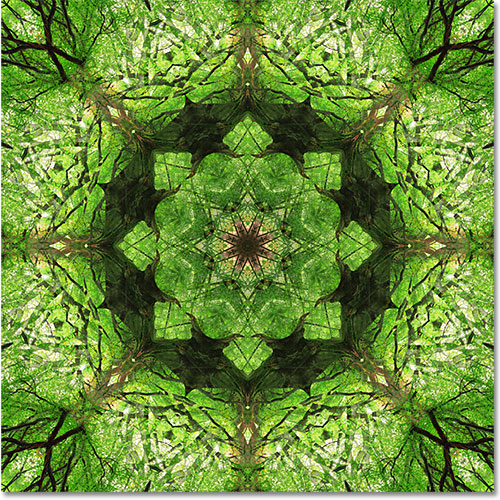
If you feel really confident about mirroring and flipping images, you can take it a step further...
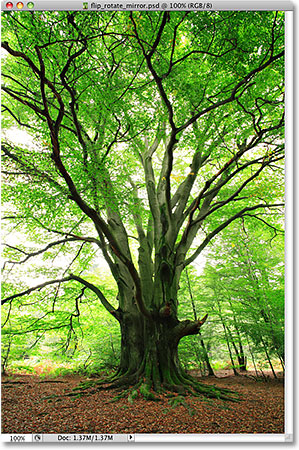
From a normal, original image...
| Original Image |
To a kaleidoscope effect!
Portraits of Self, Portraits of Others
Emmit Gowin
Today, in class, talked about Portraiture. I showed some great portrait artists and then we got into groups and started to photograph one another.
Finding Vivian Maier, trailer
Richard Avedon, "Darkness and Light"
I showed the Vivian Maier trailer video and also part 1 of this video on Richard Avedon. The Avedon video is a bit long; I only showed the first 30 minutes or so. (But you are welcome to watch it in it's entirety. It's quite good.)
Your project for the week is:
- Find five great portrait photographers online. I want you to tell me who took the pictures and why you like the images, and then add them to your blog in one post before next class.
- (So: An image of theirs. Their name. And what you like about the picture / why you chose them.)
- I've included some photographers to look at for inspiration at the bottom of the post.
- Your goal for the week is to make is to make great portraits of other people and also yourself. The photograph needs to be strong compositionally, be interesting to look at, and should tell us something about the person being photographed. A pretty tall order... sounds a lot like a collaboration between the subject and the photographer to me... You should have at least 5 GREAT images. (At least 1 must be a self-portait.)
ALL OF THEM. We will work on basic image editing next week.
The following images were made by Edward Curtis, he is the fellow on the right with the fine hat and goatee. He started this project to record the way of life of the North American Indian in 1907, and made more than 40,000 images of them. You can see many of them at the Library of Congress.
Richard Avedon, Marian Anderson, 1955.
Diane Arbus, Boy with Handgrenade.(Left) Contact Sheet (Right)
Here is a great resource on contemporary intimate portraiture: http://www.americanphotomag.com/photo-gallery/2014/01/intimate-portraits?page=14
| Elinor Carucci, Trying to protect Emmanuelle |
| Annie Liebovitz, Queen Elizabeth II |
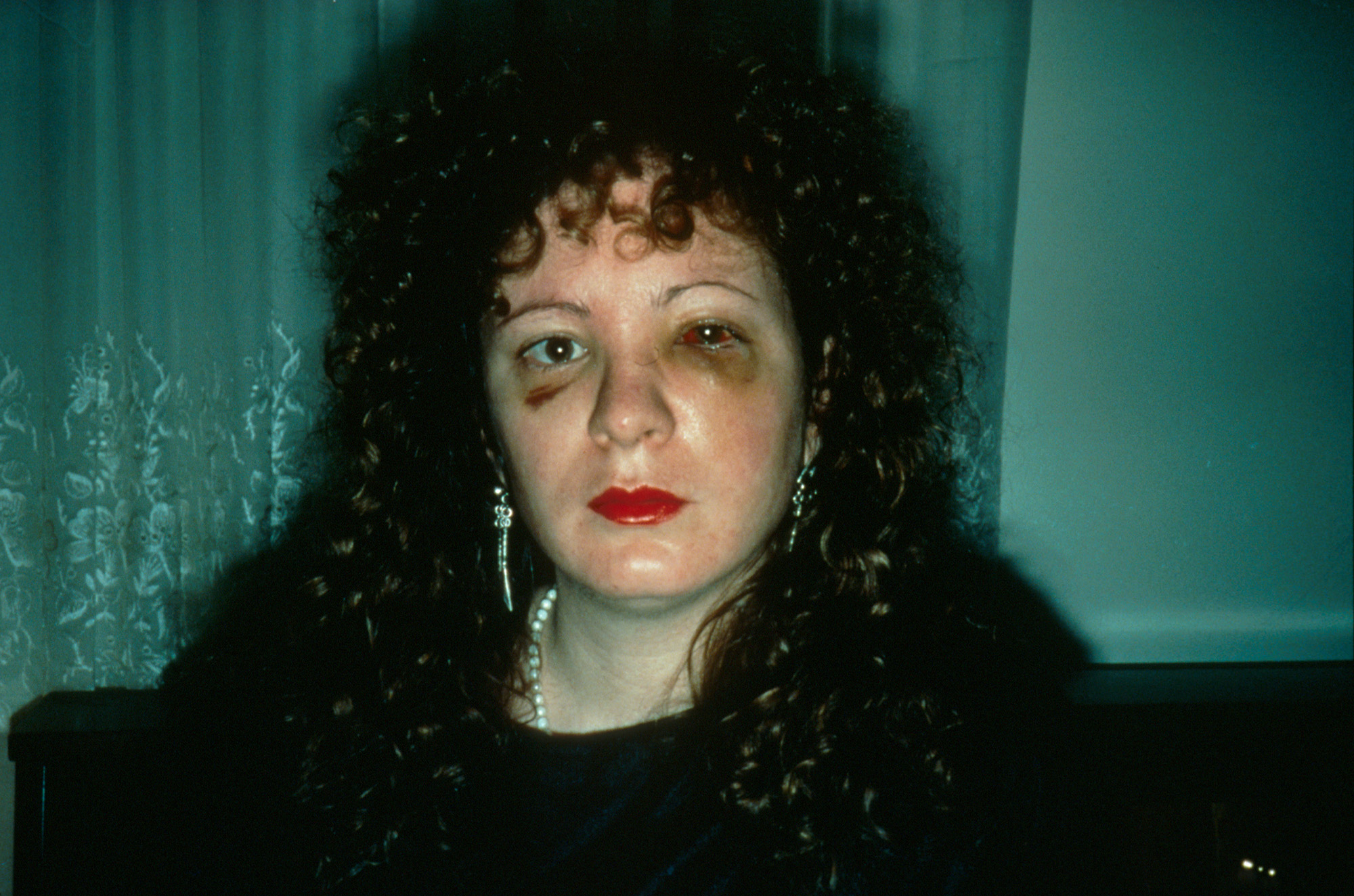
| Nan Goldin, Battered |
| Ji Yeo |
Monday, September 15, 2014
James Ford
My name is James Ford and I am currently a senior according to the amount of hours I have. I am majoring in Visual Communication with emphasis in New Media. I have a little experience with graphic/web design and 3d animation. After I graduate I would love to have a job using any and/or all of the three.
Friday, September 12, 2014
Helder Sousa
The blog name is urbanautica and the layout of the blog is quite sophisticated. It has a grey background with a continuous scroll making the interphase of the website run smoothly. The blog was unique and interesting because it provided photos of photographers and a set of questions relating to themselves. This helps you see different kinds of styles from photographers and provides a more personal approach of the photographs. I love this blog!
Initially I fell for the article because of the name urbanautica! It attracted my attention because I am a city person and the word "urban" just made it for me. The images also attracted my attention because this blog provided various photographers and different styles of photos. This allow me to have more to choose from. I was curious to know more about the photographer because he portray photos about his country's abandon projects. I found it to be a really nice thing from him to do!
Week 3 Recap
![]() |
| James Meaux |
We also reviewed Lightroom and watched two Adobe.tv videos. One on Lightroom CC Interface and one on Lightroom / Photoshop Workflow.
PHOTOSHOP:
In case you haven't guessed, we are going to start working with Photoshop now. The first two mini projects will deal with working with layers in Photoshop.
Photoshop Basics Tutorial
This video is a bit on the cheesy side, but it will give you a run down of most of the basic tools and features in CS6.
- Many of the options being shown are more advanced and we will not get to them until later in the semester. But it is good to know that they exist and where they are.
Here are some Quick Key Cheat Sheets for Macs & PC's:

We also started working on our Obsessive Collections Collage. Please see the "Assignments" tab for details.
![]() |
| Collage Test |
Here is a tutorial demonstrating how to work with image layers in Photoshop.
![]() |
| http://vimeo.com/86738829 |
http://www.clickinmoms.com/blog/how-to-create-collage-templates-in-photoshop-elements/
Subscribe to:
Posts (Atom)